You worked hard to generate those leads. You paid for the ads, wrote the content, stood at the trade show booth. Then the leads get lost. Some sit in a spreadsheet and land in the CRM two weeks later, when the moment has passed. Others fill in a form, nobody answers, and they go to a competitor instead.
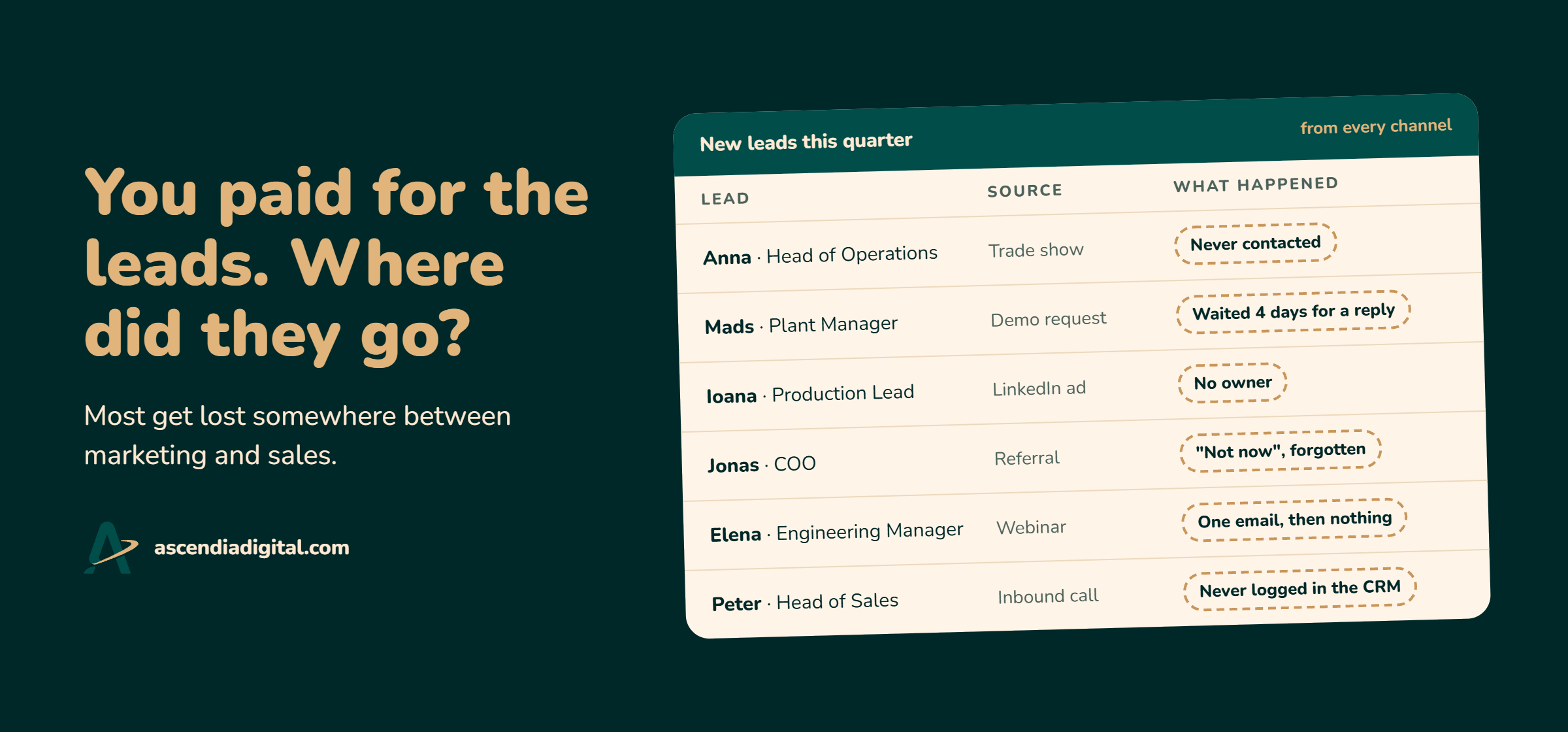
When leads don't turn into deals, the usual fix is more budget to generate more leads. But more leads won't help if your process keeps losing them. Fix your lead management first, and you get more out of every lead you already pay for.
This guide shows you how to set up lead management correctly in HubSpot, so no lead falls through the cracks. It covers what lead management is, what to decide before you build anything, how to put it into HubSpot, and how to find where your process leaks.
In this guide
- What is lead management?
- Why is lead management important for B2B?
- What are the stages of lead management?
- How to build a lead management system in HubSpot
- How do you find where your lead management process breaks?
- Common lead management mistakes to avoid
- Need help building your lead management system in HubSpot?
- Frequently asked questions
What is lead management?
Lead management is the process that decides what happens to every lead, from the first sign of interest until they become a customer. It's how marketing and sales work together as a team, with shared rules: leads ready for a sales conversation get prompt follow-up from sales, while the rest are nurtured by marketing until the timing is right. Done well, no lead you've paid for slips through the cracks.
Why is lead management important for B2B?
Lead management is important for B2B because it helps turn leads into revenue.
B2B companies spend serious budgets attracting potential customers through trade shows, ads, banners, social media, and content creation. But B2B buying is complex. Sales cycles can run for months, several people weigh in, and nobody buys the moment they submit a form.
Reach out too early, and you risk pushing them away. Wait too long once they're ready, and they might go to a competitor.
Lead management closes that gap. It makes sure every lead gets the right attention at the right time, based on where they are in their buying journey. That way, the money you spend attracting leads has a better chance of paying off.
A good lead management process pays off in four places:
- For marketing, it shows what's working and improves ROI. Generating 300 leads at a trade show sounds great, but it tells you very little until you know how many became qualified opportunities or customers. When you can follow leads through to revenue, you know which channels and campaigns are worth investing in and which ones need a rethink.
- For sales, it helps prioritize time. Sales reps can focus on leads who are ready to have a conversation, rather than spending their days chasing people who are still researching or aren't a good fit. They also know when to follow up and what has already happened.
- Between marketing and sales, it closes the gap. Clear qualification criteria and handoff rules mean everyone knows when a lead is ready for sales, who is responsible for following up, and what happens if they're not ready yet. Fewer leads get forgotten or fall through the cracks.
- For the lead, it creates a better buying experience. They receive useful, relevant information while they're researching, rather than being pushed into a sales conversation too early. And when they're ready to talk, they get a timely response instead of being left waiting.
What are the stages of lead management?
Lead management has four stages: lead capture, qualification, routing and handoff, and nurturing. Each stage has a clear purpose and outcome. Together, they make sure every lead is captured, evaluated, followed up, and kept engaged until they're ready to buy.
The process isn't always linear. Some leads are ready for sales straight away, while others need months of nurturing. And when sales discovers that a lead isn't ready, it goes back to nurturing until there's a reason to revisit it.
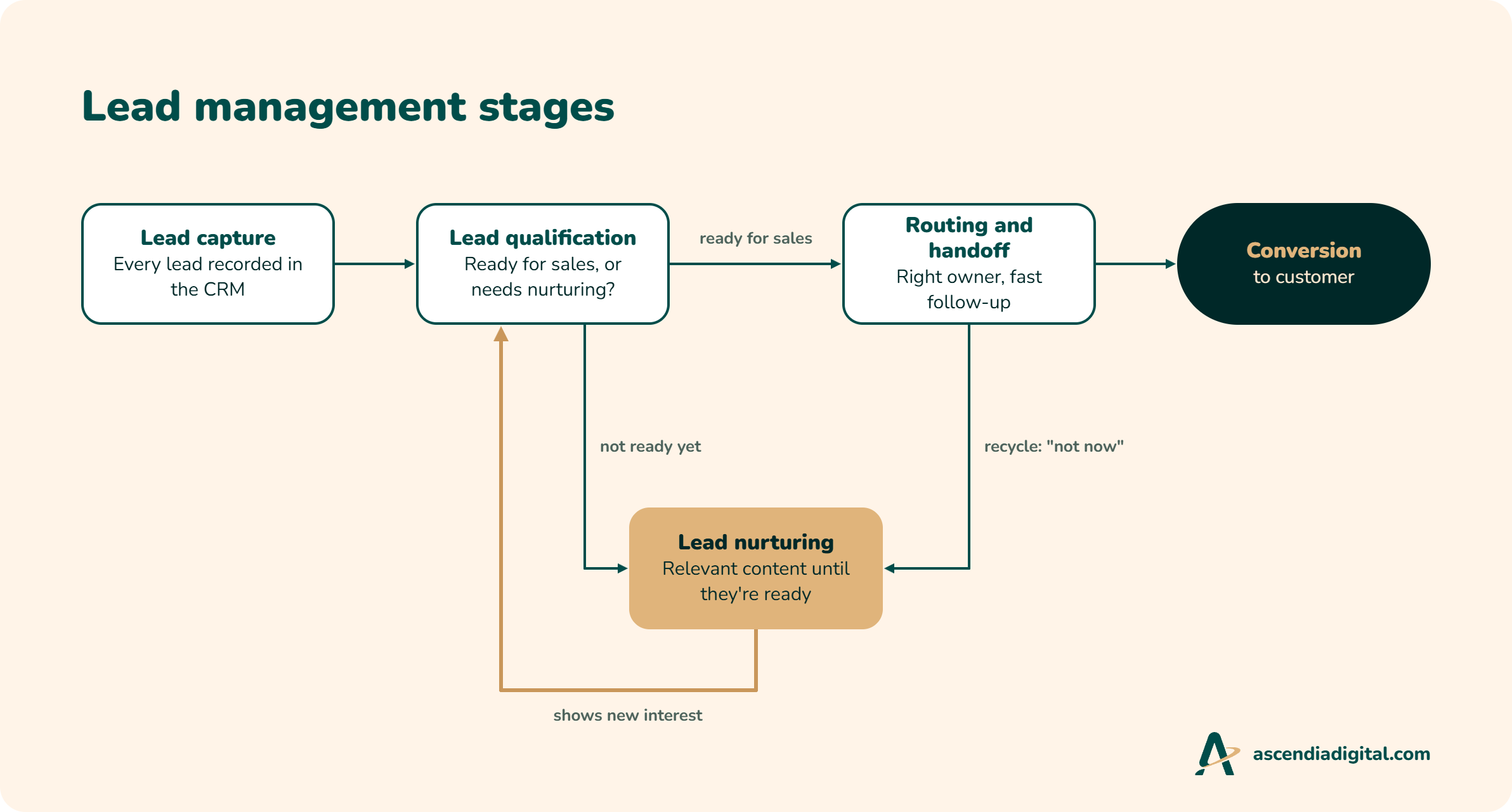
1. Lead capture
Lead capture is the process of collecting potential customers' information from different channels and recording it in your CRM, with enough context to act on it.
Interest can come from many places: website forms, chat, ad lead forms, events, webinars, the info@ inbox, phone calls, and referrals. Capture works when every identifiable lead from these sources is recorded in the CRM promptly, with four key pieces of information: who the person is, what they're interested in, where they came from, and when they reached out. Relevant communication preferences and consent should also be recorded.
This stage often breaks down because of manual work. Think of trade show contacts sitting in a spreadsheet for two weeks before someone remembers to import them into the CRM.
Result: Every identifiable lead is recorded in the CRM, with the information and context needed for the next steps.
2. Lead qualification
Lead qualification is the process of deciding whether a lead is a good fit for your business, ready for a sales conversation, or needs further nurturing.
Qualification looks at two things: fit and intent. Fit is whether the lead matches the companies and roles you sell to. Intent is how strongly they've signalled an interest in buying. A demo request usually says more about buying intent than an ebook download, for example.
Lead scoring can help evaluate these signals and prioritize leads, especially when they're somewhere in between. The important thing is to have clear qualification criteria that marketing and sales agree on together. And qualification isn't a one-time decision. A returning contact who shows new interest should be evaluated again.
Result: Every lead has a clear status: ready for sales, needs nurturing, or isn't a fit.
3. Lead routing and handoff
Lead routing and handoff is the process of assigning sales-ready leads to the right salesperson and making sure they receive a timely, informed follow-up.
The right salesperson should receive the lead promptly, along with the context needed to follow up: where the lead came from, what they're interested in, and what interactions they've had with the company. Routing rules might depend on geography, industry, company size, product interest, or territory.
The handoff also needs clear expectations. Who is responsible for following up? How quickly should they respond? What happens when someone is on holiday? Sales should follow an agreed response time and follow-up routine, then record the outcome in the CRM so marketing knows what happened to the lead.
Result: Every sales-ready lead has an owner and a recorded outcome: an opportunity is created, the lead goes back to nurturing as "not now", or it's marked as not a fit.
4. Lead nurturing
Lead nurturing is the process of building relationships with potential customers who aren't ready to buy yet, using relevant content and communication until they're ready for a sales conversation.
Two types of leads often end up here: leads who show interest but aren't ready for sales, such as someone who downloads a brochure or signs up for a webinar, and leads that sales sends back as "not now".
Not every lead needs the same content. Someone researching a product needs different information from someone comparing suppliers or evaluating solutions. Nurturing should reflect what the lead is interested in and where they are in their buying journey.
When a lead shows new buying intent, or an agreed follow-up date arrives, they're reassessed and can move back to sales.
Result: Leads who aren't ready stay engaged, with a clear path back to qualification and sales when the time is right.
Nurturing is also the stage many companies overlook. Sales says "not now", marks the lead as closed, and nobody keeps in touch. But "not now" often means "not yet". Without a process to stay relevant and reconnect when the timing is right, that potential customer might end up buying from a competitor instead.
How to build a lead management system in HubSpot
A good lead management system starts with understanding how your business handles leads today and deciding how that process should work. Only then do you build it in HubSpot. In practice, that means five steps: understand your current process, agree on what makes a lead worth pursuing, design the process between marketing and sales, build it in HubSpot, and test it before you roll it out.
Before configuring anything in HubSpot, you need to answer some important questions: Where do leads come from? What makes someone worth pursuing? Who is responsible for following up? What happens when a lead isn't ready to buy?
Here's how I'd approach building a lead management system for a B2B company.
1. Understand your current lead management process
Start by looking at what happens today. Talk to the people involved in marketing and sales and map the journey from the moment someone becomes a lead until they become a customer.
Look for the gaps.
Are leads coming from trade shows being entered into the CRM weeks later? Does marketing send every new contact to sales, regardless of their interest? Are salespeople following up consistently? What happens when someone isn't ready to buy?
Don't assume the CRM reflects how the business actually works. Sometimes the real process happens in spreadsheets, email inboxes, or individual salespeople's heads.
The goal is to understand what's working, what's broken, and where potential customers are getting lost.
This is exactly what a lead management audit covers: where leads get lost, why it happens, and what it's costing you.
2. Agree on what makes a lead worth pursuing
One of the most important decisions is defining what a qualified lead means for your business.
Marketing and sales need to agree on the characteristics of a good potential customer and the signals that suggest they're ready to buy.
For example, a robotics manufacturer might consider a company in the manufacturing industry with an established production facility a good fit. But that doesn't mean every contact from that company is ready for a sales conversation.
Document your criteria and agree on what happens to each type of lead. Which ones go straight to sales? Which ones need more nurturing? Which ones should be excluded altogether?
These decisions will become the foundation of your qualification rules in HubSpot.
3. Design the process between marketing and sales
Now that you know what makes a lead qualified, decide what happens next.
This is where many companies have gaps. Marketing might be responsible for generating leads, but who owns them once they're ready for sales? How quickly should sales respond? What happens if the salesperson doesn't get an answer? And what if the lead is interested but the timing isn't right?
Define the rules together. For example:
- A qualified lead is assigned based on geography or product interest.
- Sales must follow up within an agreed timeframe.
- If a lead isn't ready to buy, sales records the reason and returns it to marketing for nurturing.
- Leads showing renewed buying intent are reassessed.
Think about the exceptions, too. What happens when an existing contact submits a new enquiry? Who handles leads when their assigned salesperson is away? What happens when a company has several contacts involved in the same buying decision?
The more clearly you define these situations, the easier it is to build a process your team can actually follow.
4. Build the system in HubSpot
Once the process is agreed upon, you can translate it into HubSpot.
This is where you decide which CRM properties, lifecycle stages, lead statuses, workflows, scoring rules, and integrations you need.
| Stage | What you decide | Where it lives in HubSpot |
|---|---|---|
| Lead capture | Which sources count, and what information every lead needs | Forms, ad and chat integrations, imports, original source, consent fields |
| Lead qualification | What makes a lead ready for sales, a nurture lead, or not a fit | Lifecycle stages, lead scoring, qualification workflows |
| Routing and handoff | Who owns which leads, how fast they respond, how outcomes are recorded | Assignment and rotation workflows, tasks, sequences, lead status or the Leads object |
| Lead nurturing | Who gets which content, and what brings a lead back to sales | Segments, nurture workflows, a "not now" reason and return date |
A few setups make the biggest difference:
- Lifecycle stages and lead statuses with written definitions, moved by workflows so the rules apply the same way every time.
- A direct route for high-intent forms. A demo or quote request marks the contact as sales-ready the moment it's submitted.
- Lead scoring with separate fit and engagement scores, so a perfect-fit company that hasn't engaged looks different from a highly engaged student.
- Assignment workflows that rotate leads or assign them by territory or product, notify the owner, and create a task due within your agreed response time. The same should happen when an existing contact makes a new enquiry, so it doesn't disappear into an old record.
- A "not now" reason and return date, so a workflow can bring the lead back to its owner at the right time.
- Nurture workflows with exit rules, so leads stop getting nurture emails once they're sales-ready or a customer.
- Source and consent on every record, including imports, so marketing can measure every channel and nurture leads legally.
- Dashboards that follow leads from source to opportunity, so marketing can see which campaigns bring revenue.
The important thing is to configure HubSpot around the process you've designed, rather than changing your process to fit whichever features happen to be available.
You don't need to automate everything, either. Start with the steps that create the most value and remove unnecessary manual work.
5. Test the process before rolling it out
Before handing the system over to your team, test it with real-life scenarios.
What happens when someone requests a demo? Does the right salesperson get notified? Is a follow-up task created? What happens when sales marks the lead as not ready? Does that contact enter the correct nurturing process? And what happens when they submit another demo request three months later?
Test both the expected journey and the exceptions.
Once everything works, train your team on the process. Make sure marketing and sales understand what they need to do, which information they need to record, and where they can see what's happening.
A lead management system only works when people actually use it. The technology supports the process, but the team needs to follow it.
How do you find where your lead management process breaks?
These six checks in HubSpot show the most common leaks. They tell you where leads are slipping through. A full lead management audit tells you why it's happening, what it's costing you, and what to fix first.
| Leak | How to check in HubSpot |
|---|---|
| Leads with no owner. Nobody's job means nobody calls. | Contacts where lifecycle stage is lead or later, and contact owner is empty. |
| High-intent leads left waiting. These people asked to talk to you. | Contacts who submitted your demo or contact form in the last 30 days, with no owner or no logged outreach. |
| Slow response. The first company to reply often gets the conversation. | The time between form submission and first sales activity. If you can't find this number easily, that's already a finding. |
| Leads with no next step. They're going cold right now. | Contacts whose lead status shows sales is working on them, and next activity date is empty. |
| Stages that don't agree. Your reports say one thing, your team does another. | Contacts marked as sales-qualified whose lead status is still lead. |
| "Not now" leads that disappeared. That's your future pipeline, sitting in silence. | Contacts sales sent back, with no marketing email in the last 60 days. |
What should you fix first?
If several lists come back full, don't fix everything at once. Go in this order:
- Owners. A lead with no owner can't be followed up. Everything else depends on this.
- Speed on high-intent leads. These are closest to a deal, so a slow reply costs the most.
- Next steps. Once every lead has an owner, make sure the owner knows what to do next.
- The way back to marketing. Stop losing "not now" leads. This is next quarter's pipeline.
- Lead scoring. Scoring finds the leads in between, but it only works once the basics run. Score leads nobody follows up, and you've just built a more detailed way to ignore them.
Talk to a HubSpot consultant
Need a HubSpot consultant to find where your leads are getting lost?
I audit HubSpot portals and fix the lead management process behind them.
Common lead management mistakes to avoid
Even with HubSpot in place, lead management can break down if the underlying process isn't clear. Here are some common mistakes to watch out for.
Sending every new lead straight to sales
Someone downloading an ebook or subscribing to a newsletter isn't necessarily ready to speak to a salesperson. Sending every new contact to sales creates unnecessary work and makes it harder to identify genuinely interested prospects. Define which actions trigger a sales handoff instead.
Not agreeing on what makes a lead qualified
If marketing and sales have different definitions of a good lead, you'll end up with friction. Marketing reports successful campaigns while sales complains about lead quality. Agree on qualification criteria together and make sure both teams understand them.
Relying on lead scoring without clear qualification criteria
A lead scoring model can assign points for website visits, email clicks, or form submissions. But a high score doesn't automatically mean someone is a good potential customer. A student researching your product might be highly engaged but still not fit your target audience. Define fit and intent first, then use scoring to support your decisions.
Having no process for leads sales rejects or sends back
A lead that isn't ready today might become a customer in six months. If sales marks it as disqualified or closes it without recording why, marketing loses the opportunity to nurture it. Define clear rejection reasons and a process for returning suitable leads to marketing.
Automating a broken process
Workflows can save time, but they can't fix unclear responsibilities or poor qualification criteria. If your process doesn't make sense manually, automating it will only make the problems happen faster. Agree on the process first, then decide what should be automated.
Measuring lead volume instead of lead quality
Generating hundreds of leads looks impressive in a marketing report, but volume alone doesn't tell you whether your campaigns are contributing to revenue. Track what happens after lead capture, including qualification, sales acceptance, opportunities, and customers.
Need help building your lead management system in HubSpot?
Setting up lead management in HubSpot involves more than creating workflows, adding properties, or configuring lead scoring. It starts with understanding how your marketing and sales teams work, agreeing on what makes a lead worth pursuing, and designing a process everyone can follow.
If your leads are getting lost, sales isn't following up, or marketing can't tell which campaigns generate real opportunities, it might be time to rethink your lead management process.
At Ascendia Digital, I help B2B companies build practical lead management systems in HubSpot. As a HubSpot Solutions Partner, I start with the process: qualification criteria, routing rules and the handoff between marketing and sales. Then I build it in HubSpot, from routing and nurture workflows to reporting, and train your team so the process sticks.
The goal is simple: give your team a clear process for managing leads, make sure potential customers don't fall through the cracks, and give marketing the visibility it needs to understand what's actually working.
Talk to a HubSpot partner
Want a lead management process that doesn't lose leads?
Book a call to talk through your HubSpot setup and where leads are getting lost.
Frequently asked questions
What is the difference between lead generation and lead management?
Lead generation gets people to show interest. Lead management decides what happens next: who qualifies the lead, who follows up, and how you stay in touch with people who aren't ready to buy. Without it, you lose leads you've already paid to attract.
What is the difference between lifecycle stage and lead status in HubSpot?
Lifecycle stage shows where a contact is in their overall journey, such as Lead, MQL, SQL, Opportunity or Customer. Lead status shows what sales is doing with them right now, such as New, Attempting to Contact or Connected. Define how the two work together.
What should happen when a lead isn't ready for sales?
Put them in a relevant nurture instead of discarding them. Record why sales isn't pursuing them, such as timing or budget, and agree what triggers the next follow-up. In HubSpot, properties, lists and workflows bring them back to sales when they show new intent or reach a follow-up date.
How quickly should sales follow up with a new lead?
For demo and quote requests, aim for the same business day. Agree on a target with sales, track the time to first sales activity in HubSpot, and make missed follow-ups visible.
Who should be responsible for lead management?
Marketing and sales share the work, but one person should own the process: often a RevOps leader, a marketing leader or, in small teams, the founder. Marketing needs to see what happens after handoff. Sales needs clear criteria and a reliable follow-up routine.
By Diana, founder of Ascendia Digital, a HubSpot Solutions Partner helping B2B teams across Europe fix their lead and sales processes.