
Leads usually don't turn into deals because nobody decided what happens to each kind of lead, not because the leads are bad. Most B2B teams blame lead quality. In the portals I work in, the leads are usually fine. They just get the wrong treatment, or none at all.
These are the three mistakes I see most:
- Calling every lead the moment they submit a form. People who were just looking feel pressured, and buyers who asked for a demo wait behind them.
- Letting low-intent leads die in the database. People who download a guide get one email, then nothing, and later buy from a competitor who kept in touch.
- Treating lost deals as dead. "Not now" deals get no follow-up date and no nurture, so nobody is there when the lead is ready.
All three leak revenue. Here's how to spot each one in HubSpot, and how to fix it.
Mistake 1: The pushy salesperson, or why calling every lead scares buyers off
Short answer: not every lead is ready to buy. When sales calls everyone the moment they submit any form, people who were just browsing feel pressured and leave.
One of the most common mistakes I see in B2B teams is sales jumping on every lead.
Imagine this. You walk into a store just to look around. Before you've taken two steps, a salesperson is at your elbow asking what you need. You smile awkwardly and say, "No, thank you, I'm just looking." The moment has turned uncomfortable, and you might walk out without buying anything.
Now imagine you walk in, go straight to the counter and say, "I'm looking for green jeans in size M, the slim fit you have in the window." You know what you want, and you're asking for help. The same salesperson is now exactly what you need.
Your leads aren't all the same, so they need different treatment. A demo or quote request is a high-intent lead. They literally raised their hand and want to talk to sales. They're the shopper at the counter. A content download, like a guide or a brochure, is a low-intent lead. They're just looking. They aren't ready to buy. They're still researching and need to learn more before they're ready to make a decision.
When sales treats every lead the same, you lose twice. You scare off leads who aren't ready yet. And you miss the real opportunities, the buyers who wanted an answer right now. Sales didn't prioritize them, because every lead looked the same. While they waited for your reply, they went to a competitor. Frustrated, sales starts calling marketing's leads junk. Marketing fires back that sales never follows up properly. Soon the two teams stop trusting each other, and your funnel pays the price.
How to spot it in HubSpot
- Every form triggers the same thing. Open the workflows behind your forms. If a guide download creates a sales task or assigns a rep just like a demo request does, sales treats every lead the same.
- Hand-raisers wait. Take your last 20 demo and quote requests and check the time between the form submission and the first call or email. If it's days, your best leads are waiting behind people who downloaded a guide.
- Downloads and demo requests close at the same rate. In a report, compare how many contacts from each form became deals. Demo requests should turn into deals far more often than downloads. If sales spends as much time on both, the effort is in the wrong place.
How to fix it in HubSpot
Define which forms are high and low intent, then route each kind differently.
- Define every source by intent. List every form and source that creates leads, and decide which are high intent and which are low. Demo requests, quote requests and contact forms are high. Downloads, webinars and newsletter signups are low.
- High-intent leads go straight to sales. A workflow assigns an owner by criteria you set (for example territory, skills or industry), creates a task due the same day and notifies the rep. Agree on a response time with sales. The faster they follow up, the better.
Tip: consider enrolling high-intent leads in an automated sales sequence sent from the rep, with the first email going out within 15 minutes. It keeps the lead hot until the rep picks up the phone. - Low-intent leads go to marketing. A workflow enrolls them in a nurture workflow based on what they downloaded, to educate them until they're ready.
Free quiz: Lead Leak Check
Not sure which of these you're doing?
The Lead Leak Check takes a few minutes and shows where leads slip through in your process.
Mistake 2: The graveyard, or what happens when you don't nurture leads
Short answer: leads who download a guide or a brochure aren't ready to buy yet, so they need to be nurtured before they are sent to sales. But without a nurture strategy and an agreed handoff from marketing to sales, they die in the database.
The opposite mistake is just as common in the portals I work in. Sales only acts on hand-raisers, and there's no strategy for anyone else. People who download a guide, join a webinar or sign up for the newsletter get one email with the material they asked for, then nothing.
Those people aren't bad leads. They're early leads. They found you and cared enough to give you their email. Months later they're ready to buy. But they don't buy from you. They buy from your competitor, because your competitor kept in touch.
How to spot it in HubSpot
- Contacts pile up at Subscriber and Lead. Filter contacts where the lifecycle stage is Lead and the last activity date is more than 90 days ago. That number is a good first look at your graveyard.
- Downloads end in one email. Open the workflow behind a guide or webinar form. If it sends the material and stops, nobody is nurturing these leads.
- Some sources have no owner. Chat conversations, event lists, imports or an old form keep adding contacts, and it's nobody's job to act on them.
How to fix it in HubSpot
Give every lead a path: nurture it, score it, and hand it to sales at a point both teams agreed on.
- Separate your leads by intent. Write down every source that creates leads, from guide downloads to webinar registrations. Then sales and marketing agree together which sources are high intent and which are low intent.
- Nurture low-intent leads. Build a nurture workflow for each main download or webinar topic, so the follow-up continues the conversation they started. End every workflow with a clear invitation to talk, not a dead end.
- Create a lead score to spot when they're ready. The nurture's job is to educate leads and raise their score, so you need a way to notice when that happens. Score fit and engagement together. Fit is who they are: job title, company size, industry. Engagement is what they do: visiting your pricing page, downloading again, clicking your emails. You need both. A student who opens every email is engaged but will never buy. A perfect-fit CFO who visited once fits but isn't ready yet. Build the score with sales, so both teams agree.
- Send them to sales at the threshold. Once a lead's score reaches the threshold you agreed on, a workflow passes it to sales with an owner and a task, so the rep reaches out while the lead is warm.
- Agree on the handoff. Marketing and sales define together what an MQL and an SQL mean and what score threshold a lead needs to cross to be passed to sales.
Mistake 3: The "not now" trap, or treating lost deals as dead
Short answer: a lost deal isn't always lost forever. Often it's just a "not now." You need a strategy to re-engage these leads when they're ready again.
Almost every team I work with makes this mistake.
A lead talks to sales. They're interested, but something is in the way: no budget this quarter, a reorganization, a contract that runs until spring, or a feature you don't have yet. The deal is marked lost and everyone moves on.
But this isn't a closed door. They showed real interest, they've seen your offer, and they told you why they couldn't buy right now. Then two things go wrong. Sales closes the deal without setting a follow-up task, so nothing reminds them to get back in touch. And marketing never looks at lost deals, so nobody nurtures these leads with content that speaks to why they said no. When the time is right again, nobody is there to follow up.
How to spot it in HubSpot
- Lost deals have no reason. Deals close lost with the reason left empty, or typed as free text nobody can report on.
- Nothing happens after a deal is lost. Filter deals closed lost in the last 12 months where the next activity date is empty. That's your "not now" pile.
- Marketing never sees lost deals. Contacts from lost deals aren't in any nurture workflow, so they hear nothing from you.
How to fix it in HubSpot
Treat "not now" as a status, not an ending: record why the deal was lost, set a date to follow up, and keep nurturing until then.
- Make the reason mandatory. Add a required "lost reason" dropdown on deals, and on leads if you use them, so nobody can close one without saying why.
- Sales sets a follow-up date. If the reason is timing or budget, a conditional property appears and the rep has to fill in when to follow up. On that date, a workflow creates a task for the rep to get back in touch. Make this part of your sales process, a step every rep follows, not something they have to remember.
- Marketing keeps them warm until then. Don't let these leads sit in the database until the follow-up date, especially if your sales cycles are long. Months of silence is enough time for them to forget you and go to a competitor once the budget frees up. Your job is to stay top of mind, so they come back to you when they're ready. Segment them by lost reason and send content that fits:
- Budget: material that helps them build the business case, like ROI examples or a cost comparison they can show their boss.
- Timing: light, useful updates such as case studies or a short monthly newsletter, so you're familiar when the moment comes.
- Missing features: news when you launch the feature they missed, or a new product that fits their needs.
How should leads flow between marketing and sales in HubSpot?
Put the three fixes together and every lead has a destination. High-intent leads go straight to sales. Low-intent leads go to marketing nurture until their score says they're ready. And a lost deal gets a follow-up date for sales and a nurture from marketing, instead of the trash.
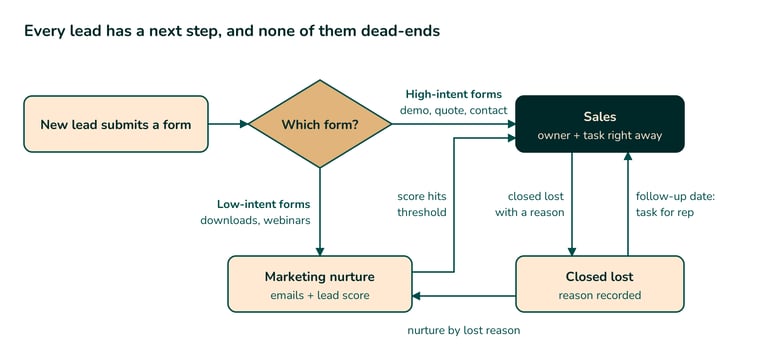
Nothing dead-ends. Every path leads either to a sales conversation or back into nurture.
Where should you start fixing your lead process?
Start with the "not now" pile. Those leads already know you, they've seen your offer, and they told you why they couldn't buy. Run the closed-lost filter from Mistake 3, make the lost reason required, and give every lost deal with a timing or budget reason a follow-up date. It's the fastest way to win back revenue you've already worked for. And in the B2B teams I work with, it's the leak almost nobody has fixed.
Then fix how new leads are handled. The first two mistakes depend on the team: without a clear process, sales either chases every lead or only the hand-raisers. Sorting your forms by intent fixes both, because every lead gets a clear owner and a next step.
Spotting the leaks is the easy part. Fixing them means deciding who owns each kind of lead, what happens next, and when it changes hands. That's different for every team, and it's what our lead management system service sets up in HubSpot.
Talk to a HubSpot partner
Want a HubSpot partner to look at your own setup?
We'll go through how leads move in your team today and spot where they slip through.
Frequently asked questions
When should a lead go to sales?
When they ask to talk, through a demo request, a quote request or a contact form. Everyone else goes into a marketing nurture first, and moves to sales once their lead score reaches the threshold sales and marketing agreed on.
How fast should sales follow up on a demo request?
As fast as possible. Agree on a response time with sales and make it visible, so nobody waits. Many teams also enroll high-intent leads in an automated sales sequence sent from the rep, with the first email going out within 15 minutes, to keep the lead warm until the rep calls.
Do you need lead scoring in HubSpot?
Yes, for leads who didn't ask to talk. The score shows when nurture has done its job and a lead is ready for sales. Score fit and engagement together: fit is who they are, engagement is what they do. Engagement alone sends sales people who will never buy.
How do you re-engage leads who said "not now"?
Make the lost reason a required field. If the reason is timing or budget, the rep sets a follow-up date, and a workflow creates a task on that date. Until then, marketing nurtures the contact with content that fits their lost reason. If they were missing a feature, they get the news when you launch it.
Why does sales say marketing leads are bad?
Usually because sales gets leads who never asked to talk and aren't ready yet. Send sales only the leads who asked, plus those whose lead score reached the agreed threshold, and the complaints about lead quality drop.
By Diana, founder of Ascendia Digital, a HubSpot Solutions Partner helping B2B teams in Denmark, Romania and across Europe fix their lead and sales processes.
.png?width=520&height=294&name=How%20to%20Automate%20your%20sales%20with%20HubSpot%20(1).png)